


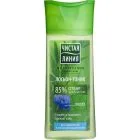
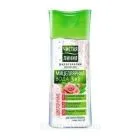
"PL" Facial tonic Youth Impulse 150 ml
In stock now — similar products


Warehouse availability
- SKU:
- V00000004525
- EAN:
- 8714100709160
Not sure what to choose?
Write to us in the chat - we help you pick the right product in plain words.
- We explain the differences
- We help you choose
- We explain delivery
What This Toner Does
PURE LINE PL Näotonik Nooruse Impulss is a facial toner designed for the cleansing and toning step after washing. It helps remove the last traces of cleanser, makeup residue and hard-water buildup, leaving the skin feeling fresher and better prepared for cream or serum. A toner does not replace washing, but it can make the skin surface feel cleaner, smoother and more balanced before the next step.
Key Component
The most notable component in this toner is magnolia phytoextract. Plant extracts from magnolia are valued in skincare for their antioxidant and soothing qualities:
- Antioxidant properties — help limit the impact of external stress factors that can make skin look dull or tired.
- Soothing qualities — help the skin feel less reactive after cleansing.
That is why a toner with magnolia is often chosen by those who want a light, refreshing product with a "youthful skin" focus rather than a heavy or oily texture.
Who It Suits and How to Use It
This toner fits well into an easy skincare regimen. It can be useful for:
- Skin that tends to feel tight after cleansing.
- People who like an extra finishing step before cream.
- Anyone who prefers a fresh, quick format between cleansing and hydration.
After washing, apply to a cotton pad and sweep gently over the face, then follow with your usual moisturiser.
Important Notes
- Avoid the eye area.
- If your skin is very sensitive or easily irritated by fragranced products or plant extracts, introduce this product gradually.
- If your skin is reactive, test on a small area first.
Specifications
| Brand | PURE LINE |
|---|---|
| Product type | Toner |
| Application area | Face |
| Action / Effect | Cleansing, Toning |
Delivery - terms and prices
After placing an order, delivery is processed on business days. Package design and product images may differ. We dispatch orders within 1–2 working days. Transit time depends on the carrier: within Estonia and to Finland usually up to 3 days, to Latvia 3–4 days, to Lithuania 4–5 days, to Poland up to 7 days. Omniva International Post shows its own lead time for each service.
- Pick-up at the Vitateka store (T1, Peterburi tee 2, Tallinn)Free
- Smartpost parcel locker2.15 €
- DPD parcel locker2.19 €
- Omniva parcel locker2.88 €
- Smartpost courier4.60 €
- DPD courier5.38 €
- Omniva courier6.20 €
- DPD parcel locker3.79 €
- Omniva parcel locker4.50 €
- DPD courier5.13 €
- Omniva courier6.05 €
- Unisend (LP Express) parcel locker2.31 €
- DPD parcel locker3.79 €
- Omniva parcel locker4.55 €
- DPD courier5.13 €
- Omniva courier6.05 €
- Posti FI parcel locker / pick-up point6.17 €
- Omniva International Post - Economy (up to 2 kg, 4–8 days)from 7.22 €
- Omniva International Post - Standard (up to 30 kg, 3–6 days)from 7.89 €
- Packeta courier to your door5.01 €
- Omniva International Post - Economy (up to 2 kg, 7–9 days)from 6.74 €
- Omniva International Post - Standard (up to 30 kg, 6–8 days)from 7.60 €
- Czech Republic - pick-up point (PUDO)from 3.93 €
- Czech Republic - courierfrom 6.10 €
- Slovakia - pick-up point (PUDO)from 3.80 €
- Slovakia - courierfrom 5.87 €
- Hungary - pick-up point (PUDO)from 4.13 €
- Hungary - courierfrom 7.42 €
- Romania - pick-up point (PUDO)from 3.61 €
Omniva International Post - the price depends on the country and the parcel weight. See the full price table on our Delivery page.
In addition to the thresholds listed above, we can consider free delivery options depending on the order amount and for deliveries to other countries. Contact us and we will suggest the best option.
Email: [email protected]
Chat: message us in the chat
Dispatch 1–2 working days; in transit: Estonia and Finland up to 3 days, Latvia 3–4 days, Lithuania 4–5 days, Poland up to 7 days.
No reviews yet
Be the first to share your experience.
Customer Questions
According to the card, before applying the cream the tonic is put on a cotton pad and clean skin is gently wiped with it. The manufacturer calls it a refreshing “10 seconds” tonic for absolute cleansing; the card does not name the frequency of use. Volume 150 ml.
The card does not speak of sensitive skin and contains no warnings. It says that the tonic contains a plant extract of magnolia and helps to preserve youth – this has no confirmation. The list of ingredients (INCI) is not on the card.
The card does not say whether the tonic replaces the cream or other stages of care. From the method of use it can be seen only that the tonic is put on a cotton pad before the cream is applied, that is, the cream remains a separate stage.
Added to your cart

How to install the app Open the shop in your browser
- 1 Tap the page menu next to the address bar, then “Share” If the share button is already in the Safari toolbar, tap it straight away.
- 2 Scroll down and choose “Add to Home Screen”
- 3 Leave “Open as Web App” switched on and tap “Add”.
On iPhone and iPad this is the only way: Apple does not let any website install an app by itself.
- 1 Tap the share button in the Safari toolbar
- 2 Scroll down and choose “Add to Home Screen”
- 3 Confirm with “Add” — the app lands on your home screen.
On iPhone and iPad this is the only way: Apple does not let any website install an app by itself.
- 1 Tap the share button in the address bar (in Firefox: open the menu, then “Share”)
- 2 Scroll down and choose “Add to Home Screen”
- 3 Confirm with “Add” — the app lands on your home screen.
No such item in your browser? Open the shop in Safari and add it from there.
This page is open inside another app (Facebook, Instagram, Google…), and nothing can be installed from there. Open the shop in Safari: choose “Open in browser” in that app’s menu, or copy the link and paste it into Safari.
This page is open inside another app (Facebook, Instagram, Google…), and nothing can be installed from there. Open the shop in Chrome: choose “Open in browser” in that app’s menu, or copy the link and paste it into Chrome.
Link copied — paste it into the address bar of your browser.
Could not copy automatically — press and hold the link below to copy it.
Open the browser menu (the three dots) and choose “Install app”.
Click the install icon in the address bar, or open the browser menu and choose “Install Vitateka”.
Open the browser menu and choose “Install app” or “Add to Home Screen”.